Public cloud costs keep rising. Your workloads are predictable, but your AWS bill isn't. You need data to stay in Canada, but you lack private cloud expertise.
This is why enterprises are returning to private cloud: not the old way with proprietary stacks and vendor lock-in, but with modern open-source platforms like Apache CloudStack.
Table of Contents
- TL;DR
- The Problem with Public Cloud for Regulated Workloads
- Why Apache CloudStack?
- Architecture Overview
- Network Architecture: Software-Defined Networking
- Key Architectural Decisions
- TCO Analysis: Private vs Public Cloud
- Hybrid Cloud: Best of Both Worlds
- Regulatory Compliance: Why Private Cloud Matters
- Edge Computing with CloudStack
- Kubernetes on CloudStack: Modern Workloads
- Public IP Addressing and Network Flexibility
- Building a Cloud Service Business on CloudStack
- When Private Cloud Makes Sense
- Next Steps
TL;DR
Private cloud with CloudStack delivers 40-60% lower TCO than public cloud for steady-state workloads. The platform provides enterprise IaaS capabilities: self-service provisioning, software-defined networking, disaster recovery, and hybrid cloud integration. All with complete data sovereignty.
Key Benefits:
- Fixed monthly costs vs unpredictable consumption pricing
- 100% Canadian data residency (PIPEDA, PHIPA, OSFI compliant)
- Zero vendor lock-in with open-source platform
- Hybrid orchestration across private and public clouds
- Production deployment in 2 weeks
The Problem with Public Cloud for Regulated Workloads
Public cloud economics work well for unpredictable workloads. You scale up during traffic spikes, scale down when quiet.
But regulated industries run predictable workloads:
- Healthcare systems processing patient records 24/7
- Financial institutions running core banking platforms
- Government agencies managing citizen data
- Manufacturing systems with steady-state operations
For these workloads, public cloud's consumption pricing becomes expensive. You pay premium rates for resources you use constantly.
Worse: data sovereignty compliance.
PIPEDA requires Canadian businesses to protect personal information. PHIPA demands healthcare data stays in Ontario. OSFI requires financial institutions to control their infrastructure.
Public cloud providers offer Canadian regions, but you don't control the physical infrastructure. Compliance auditors want proof. Private cloud gives you that proof.
Why Apache CloudStack?
CloudStack is a battle-tested IaaS platform trusted by 600+ cloud providers worldwide. It's the same technology powering large-scale public clouds, but you run it on your infrastructure.
Three reasons CloudStack wins for private cloud:
1. Zero Vendor Lock-In
VMware costs $5,000–$15,000 per CPU socket. HPE GreenLake requires multi-year commitments. Both lock you into proprietary ecosystems.
CloudStack is open-source (Apache License 2.0). Your infrastructure, your rules. If you outgrow your provider or want to self-manage, you can do so without migration costs.
2. Hybrid Cloud Ready
CloudStack supports multiple hypervisors (KVM, VMware, XenServer) and integrates with public clouds. You can:
- Run steady-state workloads on private cloud (lower cost)
- Burst to AWS/Azure for traffic spikes (elasticity)
- Orchestrate everything from one management interface
This is true hybrid cloud. Not VPN connections alone, but unified orchestration across environments.
3. Production-Proven Architecture
CloudStack powers clouds serving millions of VMs. The architecture provides:
- High availability - Management server clustering, automatic VM migration
- Disaster recovery - Cross-zone instance restore (new in 4.22 LTS)
- Self-service - Web UI for provisioning VMs, networks, storage
- Automation - REST API for infrastructure-as-code
You get enterprise capabilities without enterprise vendor pricing.
Architecture Overview
A production CloudStack deployment consists of three layers:
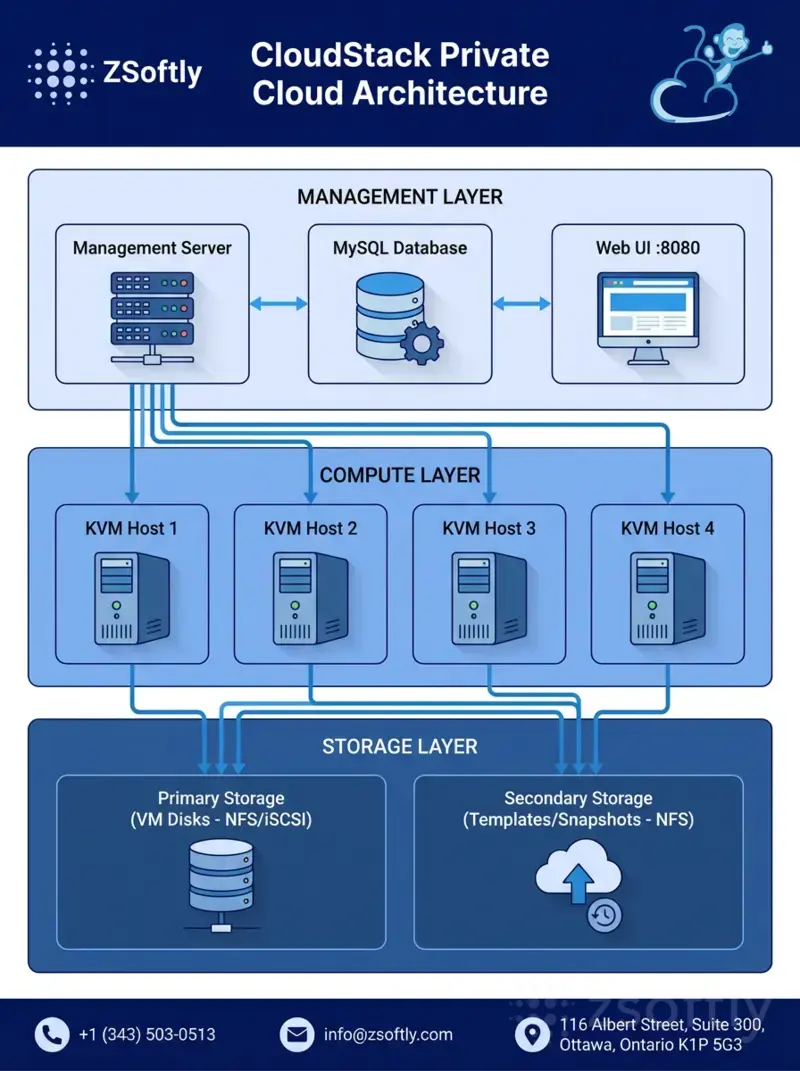 Figure: CloudStack three-layer architecture - Management, Compute, and Storage layers working together
Management Layer
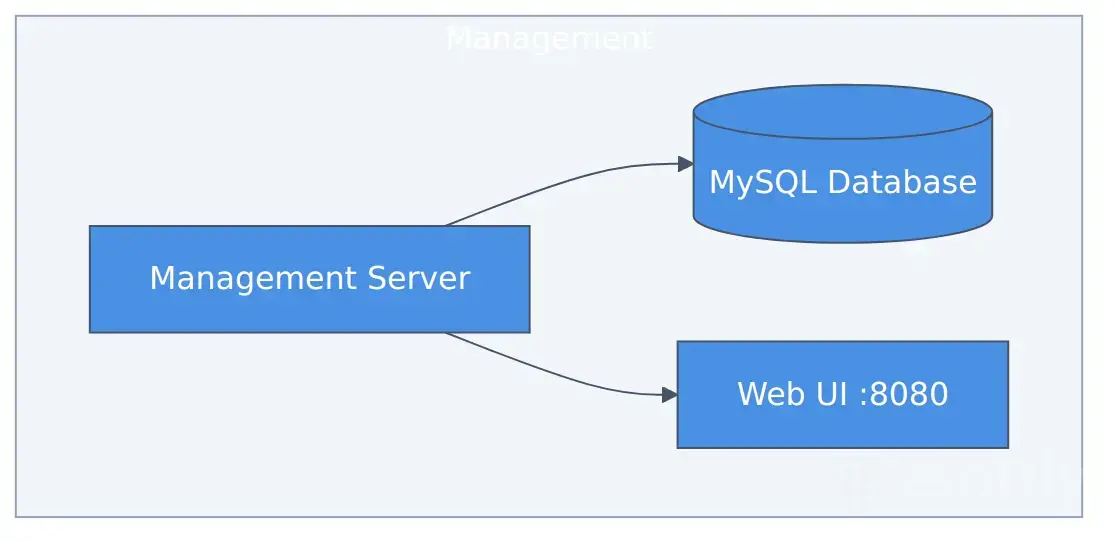 Management Server orchestrates everything: VM provisioning, network configuration, storage management, monitoring
The management server orchestrates everything: VM provisioning, network configuration, storage management, monitoring. MySQL stores state. The web UI provides self-service provisioning for teams.
High availability: Deploy 2+ management servers behind a load balancer. If one fails, the other handles requests.
Compute Layer
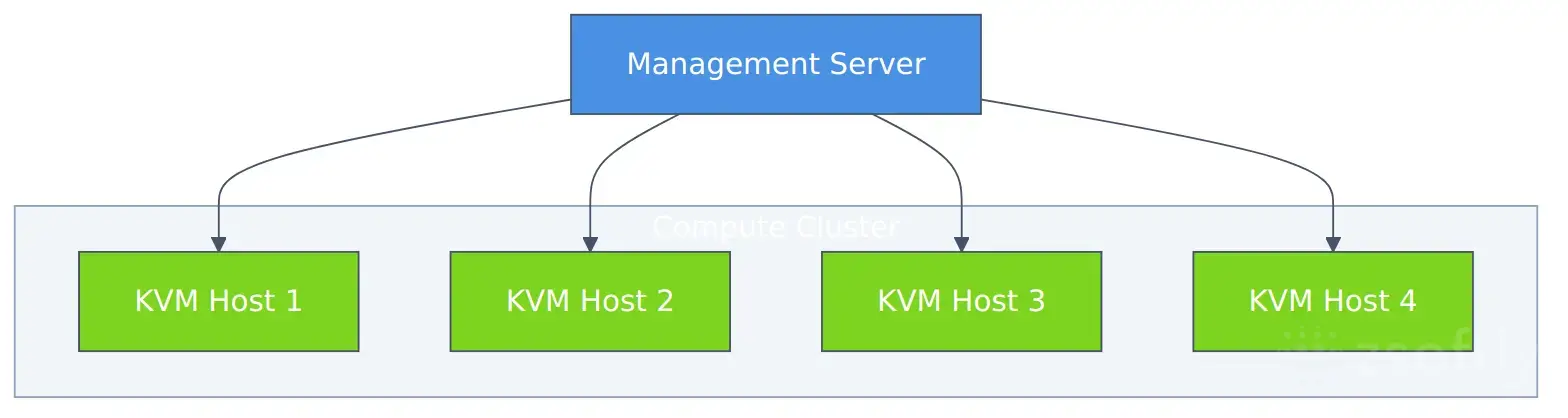 Four KVM hypervisor nodes provide N+1 redundancy, live migration, and horizontal scaling
KVM hypervisor nodes run your virtual machines. Four nodes provide:
- N+1 redundancy - Cluster survives single node failure
- Live migration - Move VMs between hosts without downtime
- Rolling updates - Patch hosts one at a time, VMs stay running
Scaling: Add more hosts as compute needs grow. CloudStack automatically distributes VMs across the cluster.
Storage Layer
CloudStack supports virtually unlimited storage with flexible backend options and tiering strategies
CloudStack's storage architecture is highly flexible and scales to meet any production demand. You can mix and match storage backends based on your performance, capacity, and budget requirements.
Storage Backend Options:
CloudStack supports multiple storage systems. Choose what fits your needs:
- Ceph RBD - Distributed, self-healing storage for maximum availability and unlimited scaling
- NFS - Simple, reliable, widely supported. Excellent for most workloads
- iSCSI (LVM) - Block-level storage for high IOPS requirements
- GlusterFS - Distributed file system for scale-out storage
- Fiber Channel SAN - Enterprise storage arrays (NetApp, EMC, Pure Storage)
- Local Storage - Direct-attached disks for maximum performance
Virtually Unlimited Capacity:
Start small and scale as you grow:
- Primary Storage: From 1TB to petabytes. CloudStack manages multiple storage pools
- Secondary Storage: Object storage (S3, MinIO, Ceph) for templates, ISOs, and snapshots
- Tiered Storage: Mix fast NVMe for hot data, bulk HDD for cold data, archive tiers for compliance
Production Storage Design Example:
- High-Performance Tier: NVMe SSDs (500K+ IOPS) for databases and transaction systems
- Standard Tier: SAS/SATA SSDs for general workloads
- Capacity Tier: High-density HDDs (18TB+) for archives and backups
- Object Storage: S3-compatible (MinIO/Ceph) for VM templates and snapshots
Hardware Flexibility:
CloudStack doesn't dictate hardware. You choose based on your workload:
- RAM: 16GB to 6TB+ per host (memory-intensive apps scale linearly)
- CPU: Standard Intel/AMD or high-core-count EPYC/Xeon for compute-heavy workloads
- GPU: NVIDIA Tesla/A100 for AI/ML, RTX for graphics workloads
- Network: 1GbE, 10GbE, 25GbE, 100GbE (CloudStack supports them all)
- Storage Density: From all-flash arrays to 100+ drive JBODs
Network Storage Performance:
- 10GbE: Standard for production (1.25GB/s throughput)
- 25GbE: High-performance workloads (3GB/s+)
- 100GbE: Large-scale deployments with extreme IOPS needs
- RDMA/NVMe-oF: Ultra-low latency for tier-0 applications
Network Architecture: Software-Defined Networking
CloudStack's networking includes virtual routers that provide:
- DHCP - Automatic IP assignment for VMs
- NAT - Private networks with outbound internet
- VPN - Site-to-site connectivity
- Load balancing - Distribute traffic across VMs
- Firewall rules - Network segmentation and security
Virtual routers provide DHCP, NAT, VPN, load balancing, and firewall services for guest VMs
Users create isolated networks on demand. The virtual router handles all networking services. No need to manage physical routers or VLANs manually.
Advanced mode: CloudStack also supports VLAN tagging for direct network access, useful for legacy applications or specific compliance requirements.
Key Architectural Decisions
1. Basic vs Advanced Networking
CloudStack offers two networking modes:
Basic: Single flat network. All VMs on same subnet. Simple to deploy, works for most use cases.
Advanced: Multiple isolated networks, VLANs, VPCs. More complex, but required for multi-tenant environments or strict network isolation.
Recommendation: Start with Basic unless you need network isolation between teams or customers.
2. Storage Backend Selection
CloudStack supports multiple storage backends simultaneously. You're not locked into one choice:
- Ceph RBD - Distributed, self-healing, scales to petabytes. Best for production clouds needing HA.
- NFS - Simple setup, widely supported. Good starting point for smaller deployments.
- iSCSI (LVM) - Block storage with high IOPS. Ideal for database workloads.
- GlusterFS - Scale-out file storage. Good for capacity-focused use cases.
- Enterprise SAN - Fiber Channel arrays (NetApp, Pure, Dell EMC). Maximum performance and features.
- Local Storage - Direct-attached SSDs. Lowest latency but no live migration.
Recommendation: Ceph for production clouds requiring high availability and horizontal scaling. NFS for development or small deployments. iSCSI for high-performance requirements. You can run multiple storage pools with different backends in the same cloud.
3. Cluster Sizing
CloudStack clusters scale from 3 nodes to hundreds. Size based on your capacity and redundancy needs:
Small Deployment (3-5 nodes):
- Use case: Development, staging, or small production workloads
- Capacity: 50-200 VMs depending on node specs
- Redundancy: N+1 (survives single node failure)
Medium Deployment (6-16 nodes):
- Use case: Production environments, multi-tenant clouds
- Capacity: 200-1,000 VMs
- Redundancy: N+2 (survives two simultaneous failures)
Large Deployment (17+ nodes):
- Use case: Service provider infrastructure, enterprise private clouds
- Capacity: 1,000-100,000+ VMs
- Redundancy: N+3 or per-tenant isolation
Hardware choices are yours:
- Budget: Whitebox servers, AMD EPYC CPUs, consumer NVMe
- Balanced: Dell PowerEdge, HPE ProLiant with enterprise SSDs
- Performance: High-core-count Xeons, all-NVMe storage, NVIDIA GPUs
- Custom: Supermicro, Lenovo, Cisco UCS (CloudStack runs on any x86 hardware)
Break-even: Private cloud ROI varies by workload, typically 4-12 months vs equivalent public cloud spend.
4. Disaster Recovery Strategy
CloudStack 4.22 LTS introduced Cross-Zone Instance Restore. This means:
- Backup VMs to secondary storage
- Restore to different zones (different data centers)
- Full disaster recovery capability without complex tooling
Best practice: Run two CloudStack zones in different Canadian cities (Toronto + Montreal). Replicate secondary storage between them. If Toronto site fails, restore VMs in Montreal.
TCO Analysis: Private vs Public Cloud
TCO varies significantly based on scale, hardware choices, and operational model. Here's a reference comparison:
Public Cloud (AWS - Typical Mid-Market)
Resources:
- Equivalent to 4x physical servers worth of compute
- 10TB storage
- Standard bandwidth
Monthly cost: ~$7,000-$10,000 Annual cost: $84,000-$120,000
Private Cloud (CloudStack)
Hardware investment range:
Budget Deployment: $15,000-$25,000
- Basic servers, NFS storage, 1GbE networking
- Good for dev/staging or small production
Production Deployment: $40,000-$80,000
- Enterprise servers, Ceph storage, 10GbE networking
- HA-ready, room for growth
High-Performance Deployment: $150,000-$300,000
- High-core CPUs, all-NVMe storage, GPUs, 25GbE+
- Maximum performance and redundancy
Operational costs (monthly):
- Colocation/data center: $500-$2,000
- Bandwidth: $200-$1,000
- Power: $200-$800
- Optional managed operations: $2,000-$5,000
Typical TCO Savings: 40-60% lower than public cloud for steady-state workloads
Break-even timeframe: 4-12 months depending on hardware investment level
Hybrid Cloud: Best of Both Worlds
Private cloud doesn't mean abandoning public cloud. CloudStack supports hybrid architectures:
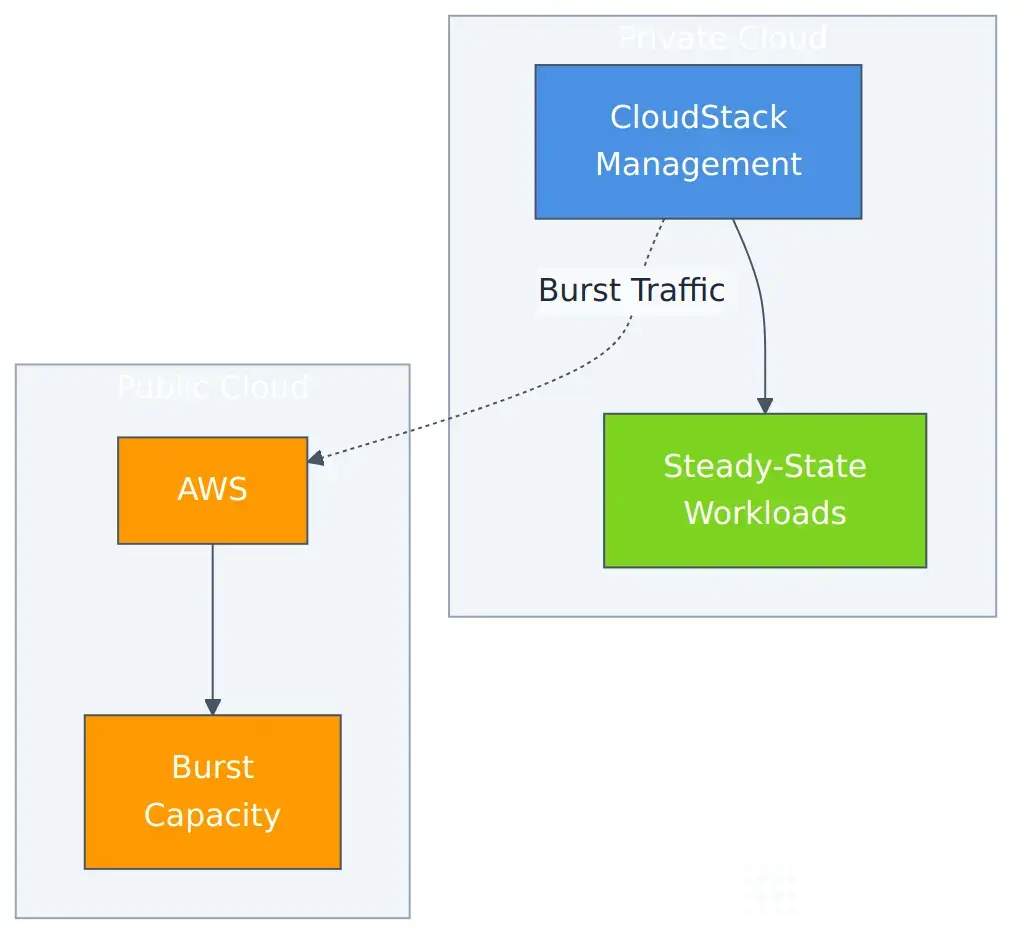 Run steady-state workloads on private cloud, burst to public cloud for traffic spikes
Use cases for hybrid:
- Cost optimization - Run baseline workloads on private cloud (lower cost), burst to AWS during traffic spikes
- Geographic expansion - Private cloud in Canada, AWS regions in US/Europe for low-latency access
- Compliance + elasticity - Regulated data on private cloud, non-sensitive workloads on public cloud
- Disaster recovery - CloudStack primary, AWS backup site (or vice versa)
CloudStack's API compatibility with AWS EC2 makes this easier. Many tools that work with AWS also work with CloudStack.
Regulatory Compliance: Why Private Cloud Matters
Canadian businesses in regulated industries face specific requirements:
Healthcare (PHIPA)
Requirement: Protected health information must stay in Ontario (for Ontario health systems).
Problem with public cloud: AWS ca-central-1 is in Montreal (Quebec), not Ontario. Your data crosses provincial boundaries.
Private cloud solution: Deploy CloudStack in Toronto data center. Data never leaves Ontario. Physical infrastructure audit-ready.
Finance (OSFI)
Requirement: Financial institutions must control their infrastructure. CLOUD Act creates foreign government access risk.
Problem with public cloud: AWS, Azure, GCP are US companies subject to CLOUD Act. Foreign governments can compel access to data.
Private cloud solution: Canadian-owned infrastructure in Canadian data centers. No CLOUD Act exposure. Full sovereignty.
Government (Treasury Board)
Requirement: Protected B data requires Canadian-controlled infrastructure with specific security controls.
Problem with public cloud: Shared responsibility model creates gaps. You can't audit the hypervisor layer.
Private cloud solution: You control the full stack. Hypervisor to application. Audit trail complete.
Edge Computing with CloudStack
CloudStack Edge Zones solve distributed infrastructure challenges:
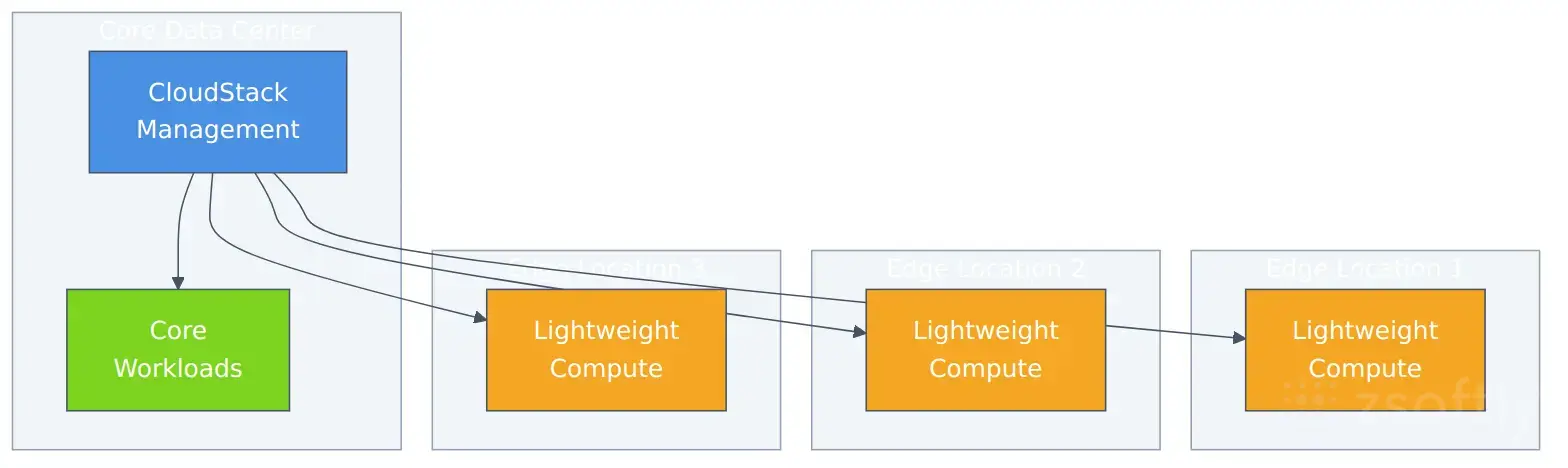 Centralized management with distributed edge compute for retail, manufacturing, healthcare, and telecom
Use cases:
- Retail chains - POS systems at each store, unified management from head office
- Manufacturing - Real-time processing at factory floor, central coordination
- Healthcare - Medical devices at clinics, secure aggregation at data center
- Telecom - Edge services for low-latency applications
Edge Zones sync with your core CloudStack, providing distributed compute with centralized management.
Kubernetes on CloudStack: Modern Workloads
CloudStack isn't just for VMs. It works well as infrastructure for Kubernetes:
Two deployment patterns:
1. VMs Running Kubernetes
Provision VMs via CloudStack, deploy Kubernetes on top. This gives you:
- CloudStack's self-service VM provisioning
- Kubernetes orchestration for containerized apps
- Easy backup/restore at VM level
- CloudStack networking for external access
2. CloudStack Kubernetes Service (CKS)
CloudStack has built-in Kubernetes support. It provisions and manages Kubernetes clusters automatically:
- Self-service cluster creation via UI/API
- Automatic node provisioning
- Integrated networking and load balancing
- Cluster lifecycle management (upgrades, scaling)
Best for: Teams wanting managed Kubernetes experience without EKS/AKS vendor lock-in.
3. Production Kubernetes Stack Example
A typical production deployment on CloudStack VMs includes:
Kubernetes Distribution:
- K3s - Lightweight Kubernetes, easy to deploy and maintain
- RKE2 - STIG-compliant for finance/government (FIPS 140-2 validated)
- EKS Anywhere - AWS-compatible for hybrid cloud deployments
Networking:
- Calico CNI - Pod networking with network policy support
- MetalLB - Load balancer IPs for services (eliminates cloud provider dependency)
- CloudStack virtual routers - DHCP, NAT, VPN, and firewall for cluster egress
Storage Integration:
- Ceph RBD - CloudStack primary storage for VM disks
- Ceph RGW (S3) - CloudStack secondary storage for templates and ISOs
- Ceph RBD CSI driver - Persistent volumes for Kubernetes workloads
- S3-compatible object storage - Application data lakes and backups
Monitoring and Operations:
- Prometheus - Metrics collection for applications and infrastructure
- Grafana - Visualization dashboards for cluster health and application metrics
- Loki - Log aggregation for centralized logging
- AlertManager - On-call notifications and incident management
This stack provides production-grade Kubernetes without vendor lock-in. You can run the same configuration on any CloudStack deployment: your private cloud, a partner's infrastructure, or a customer's air-gapped environment.
Public IP Addressing and Network Flexibility
CloudStack provides complete control over IP addressing. You're not limited to private networks:
Bring Your Own IP Blocks
Purchase public IPv4/IPv6 blocks from regional internet registries (ARIN, RIPE) or IP brokers:
- IPv4 blocks: /24 (256 IPs), /23 (512 IPs), or larger (you own them outright)
- IPv6 blocks: /48 or /56 (free from registries, thousands of IPs)
- Provider-assigned: Many colocation facilities offer IP blocks with rack space
Link public IPs to your private cloud:
- Purchase IP block from broker (e.g., $15-$25 per IPv4 address one-time)
- Register block with your ASN (or use provider's)
- Configure BGP routing to your CloudStack infrastructure
- CloudStack assigns IPs from your pool to VMs automatically
Direct Public IP Assignment
Unlike public clouds that charge for elastic IPs, you control your addressing:
- No per-IP fees - Own your IPs, no monthly charges
- Static assignments - VMs get permanent public IPs
- Portable - Move IPs between VMs, zones, or providers
- Multi-homing - Advertise your IPs via multiple transit providers
Example: Buy a /24 IPv4 block ($4,000-$6,000), get 256 public IPs with zero monthly fees. AWS charges $3.65/month per elastic IP = $933/month for equivalent.
Advanced Networking
CloudStack supports enterprise networking features:
- BGP routing - Advertise your IP blocks, control traffic paths
- Multiple VLANs - Isolate networks at layer 2
- VPC networking - AWS-like virtual private clouds with multiple tiers
- Shared networks - Multiple accounts on same network (provider mode)
- Dedicated networks - Fully isolated per-tenant networks
Building a Cloud Service Business on CloudStack
CloudStack isn't just for private infrastructure. It's the platform powering 600+ cloud service providers worldwide. You can monetize your infrastructure by selling IaaS or PaaS to customers.
Selling IaaS: Multi-Tenant Cloud Hosting
CloudStack provides complete multi-tenancy out of the box:
Self-Service Portal:
- Customers provision VMs, networks, storage via web UI or API
- Resource quotas per account (vCPUs, RAM, storage, IPs)
- Usage metering for billing integration
- Role-based access control (admin, user, domain admin)
Billing Integration:
- CloudStack tracks resource usage (CPU hours, storage GB, bandwidth)
- Export to billing platforms (WHMCS, Blesta, HostBill, custom)
- Charge per hour, month, or resource consumption
- Automated provisioning and deprovisioning
Example IaaS Pricing:
- VMs: $0.02-$0.08/hour (vs AWS $0.10-$0.40)
- Storage: $0.10-$0.25/GB/month (vs AWS $0.10-$0.23)
- Bandwidth: $0.01-$0.05/GB (vs AWS $0.09)
- Public IPs: $3-$5/month (vs AWS $3.65)
Target customers:
- Startups needing Canadian data residency
- Agencies requiring client infrastructure isolation
- SaaS companies with predictable workloads
- Compliance-heavy industries (healthcare, finance, legal)
Selling PaaS: Managed Application Hosting
Layer PaaS platforms on top of CloudStack for higher margins:
Option 1: Dokploy (Open-Source PaaS)
Dokploy runs on CloudStack VMs and provides:
- Git-push deployment (Heroku-like experience)
- Automatic SSL, databases, caching
- Docker container management
- Simple pricing: $20-$100/month per app
Setup: Deploy Dokploy on CloudStack VMs, sell managed hosting to customers who want "deploy and forget" simplicity.
Option 2: CapRover (Self-Hosted PaaS)
Similar to Dokploy but focused on Docker apps:
- One-click app deployments (WordPress, databases, etc.)
- Automatic scaling and load balancing
- Built-in monitoring and logging
Option 3: Kubernetes PaaS
Use CloudStack Kubernetes Service (CKS) as infrastructure, layer on:
- Rancher - Multi-cluster Kubernetes management
- OpenShift - Enterprise Kubernetes platform
- Kubesphere - Full-featured Kubernetes PaaS
PaaS pricing examples:
- Simple web apps: $20-$50/month
- Database hosting: $30-$100/month (Postgres, MySQL, MongoDB)
- WordPress hosting: $15-$40/month
- Custom containers: $50-$200/month
Margins: 60-80% gross margin on PaaS (you pay $10-$20 in infrastructure costs, charge $50-$100)
E-Commerce Layer for Automated Sales
Build a customer-facing storefront:
WHMCS Integration:
- Automated VM provisioning via CloudStack API
- Billing, invoicing, payment processing
- Support ticket system
- Client portal for managing VMs
Custom Portal:
- React/Next.js storefront
- CloudStack API backend
- Stripe/PayPal for payments
- Automated provisioning pipeline
Serverless Billing:
- Usage-based pricing with automated metering
- Invoice generation and payment collection
- Resource limits and suspension for non-payment
- Upgrade/downgrade flows
Business Models
Model 1: Infrastructure Reseller
- Buy hardware, sell VM hours
- $50K hardware = 200 VMs capacity
- Charge $10-$30/VM/month = $2,000-$6,000/month revenue
- ROI: 12-24 months
Model 2: Managed PaaS Provider
- CloudStack infrastructure + Dokploy/CapRover
- Target small businesses and developers
- Charge $20-$100/app/month
- 100 customers = $2,000-$10,000/month recurring
Model 3: Compliance Cloud
- PIPEDA/PHIPA-compliant hosting for Canadian healthcare
- Premium pricing for regulatory features
- Charge $100-$500/VM/month
- Fewer customers, higher margins
Model 4: White-Label Cloud
- Sell to MSPs and agencies
- They rebrand and resell to their customers
- Wholesale pricing, volume-based
When Private Cloud Makes Sense
Private cloud isn't for everyone. Here's when it wins:
✅ Good Fit for Private Cloud
- Regulated industries - Healthcare, finance, government with data sovereignty requirements
- Predictable workloads - Steady-state capacity running 24/7
- Cost-conscious enterprises - Monthly cloud spend $10K+ with room for optimization
- Sovereignty requirements - Data must stay in Canada for legal or policy reasons
- Multi-tenant MSPs - Cloud service providers wanting white-label offerings
❌ Not a Good Fit
- Unpredictable traffic - Workloads with massive spikes (e-commerce during Black Friday)
- Rapid scaling needs - Startups growing 10x in weeks need elasticity
- No infrastructure expertise - If you have zero ops capacity, public cloud's managed services are easier
- Global footprint - Applications needing presence in 20+ countries (use hybrid approach)
- Serverless-first architectures - Lambda/Functions as primary compute model
Hybrid cloud solves most edge cases: Run baseline on private, burst to public for peaks.
Next Steps
Building private cloud infrastructure requires expertise in virtualization, networking, storage, and automation. Most enterprises don't have this expertise in-house.
Three options:
1. Self-Deploy (DIY)
Download CloudStack, provision hardware, configure everything yourself. Takes 2–6 months depending on experience. Best for teams with strong infrastructure backgrounds.
2. Managed Deployment
Hire cloud architects to design and deploy your infrastructure. Typical timeline: 2 weeks. Operational runbooks included. Best for teams wanting infrastructure quickly without building expertise.
3. Fully Managed Private Cloud
Your infrastructure, but operated 24/7 by experts. Monitoring, patching, disaster recovery, capacity planning handled for you. Best for teams wanting cloud benefits without ops burden.
Getting Started
Learn More:
- Apache CloudStack Documentation
- Private Cloud Service Overview
- Q1 2026 Deployment Offer
- Case Study: Apache CloudStack Private Cloud for PaaS Provider
Questions? Book a 15-minute consultation to discuss your private cloud requirements.
Private cloud isn't a step backward. It's a strategic choice. When you need data sovereignty, cost predictability, and infrastructure control, CloudStack delivers enterprise capabilities without vendor lock-in.