We had a problem. Four applications. Four separate PostgreSQL clusters. 91MB of actual data spread across 50Gi of allocated storage.
Each cluster created its own PodDisruptionBudget. Node drains during maintenance became difficult. Karpenter struggled to consolidate workloads.
This is the story of how we consolidated everything into a single HA cluster with PgBouncer connection pooling.
TL;DR
We consolidated 4 CloudNativePG clusters into 1 shared cluster with PgBouncer. The key gotcha: ArgoCD sync waves are required when using ExternalSecrets with CNPG, or the cluster bootstraps with the wrong password.
Results:
- 4 PDBs reduced to 1
- 50Gi storage reduced to 30Gi (40% less)
- High availability added (2 replicas with streaming replication)
- Connection pooling enabled via PgBouncer
- Single backup schedule instead of 4
The Problem
Our platform ran four internal applications, each with its own CloudNativePG database:
| App | Instances | Storage | CPU | Memory | Data Size |
|---|---|---|---|---|---|
| n8n | 1 | 20Gi | 100m | 256Mi | 11 MB |
| vaultwarden | 1 | 5Gi | 100m | 256Mi | 9 MB |
| wikijs | 1 | 5Gi | 100m | 256Mi | 10 MB |
| zammad | 1 | 20Gi | 250m | 512Mi | 61 MB |
| Total | 4 pods | 50Gi | 550m | 1.3Gi | 91 MB |
91MB of data. 50Gi of provisioned storage. Four separate upgrade cycles to coordinate.
The real issue was PodDisruptionBudgets. Each CNPG cluster creates a PDB that blocks node drains until replicas are ready. With single-instance clusters, nodes could not drain at all during maintenance windows.
Why These 4 Apps?
Before consolidating, we analyzed access patterns and compatibility:
- Low write frequency - All four apps have minimal concurrent writes. No risk of lock contention.
- Independent schemas - Each app uses its own database. No shared tables or cross-database queries.
- Similar SLAs - All are internal tools. A brief maintenance window is acceptable.
- Non-critical workloads - These support internal workflows, not customer-facing production.
Critical apps keep their own clusters. Our production databases (customer data, billing, auth) remain on dedicated CNPG clusters with separate backup schedules, stricter PDBs, and isolated failure domains. Consolidation is not a universal solution—it fits workloads with compatible access patterns and similar reliability requirements.
The Solution
One shared PostgreSQL cluster with PgBouncer connection pooling. This also gave us High Availability—something the individual single-instance clusters lacked.
| Component | Instances | Storage | CPU | Memory |
|---|---|---|---|---|
| platform-db | 2 (HA) | 30Gi | 500m | 1Gi |
| pgbouncer | 2 | - | 100m | 128Mi |
| Total | 4 pods | 30Gi | 700m | 1.3Gi |
Same pod count. Less storage. High availability included.
The Architecture
Before: 4 Separate Clusters

Each application had its own dedicated CloudNativePG cluster. Four PodDisruptionBudgets. Four backup schedules. 50Gi of storage for 91MB of data.
After: 1 Shared Cluster
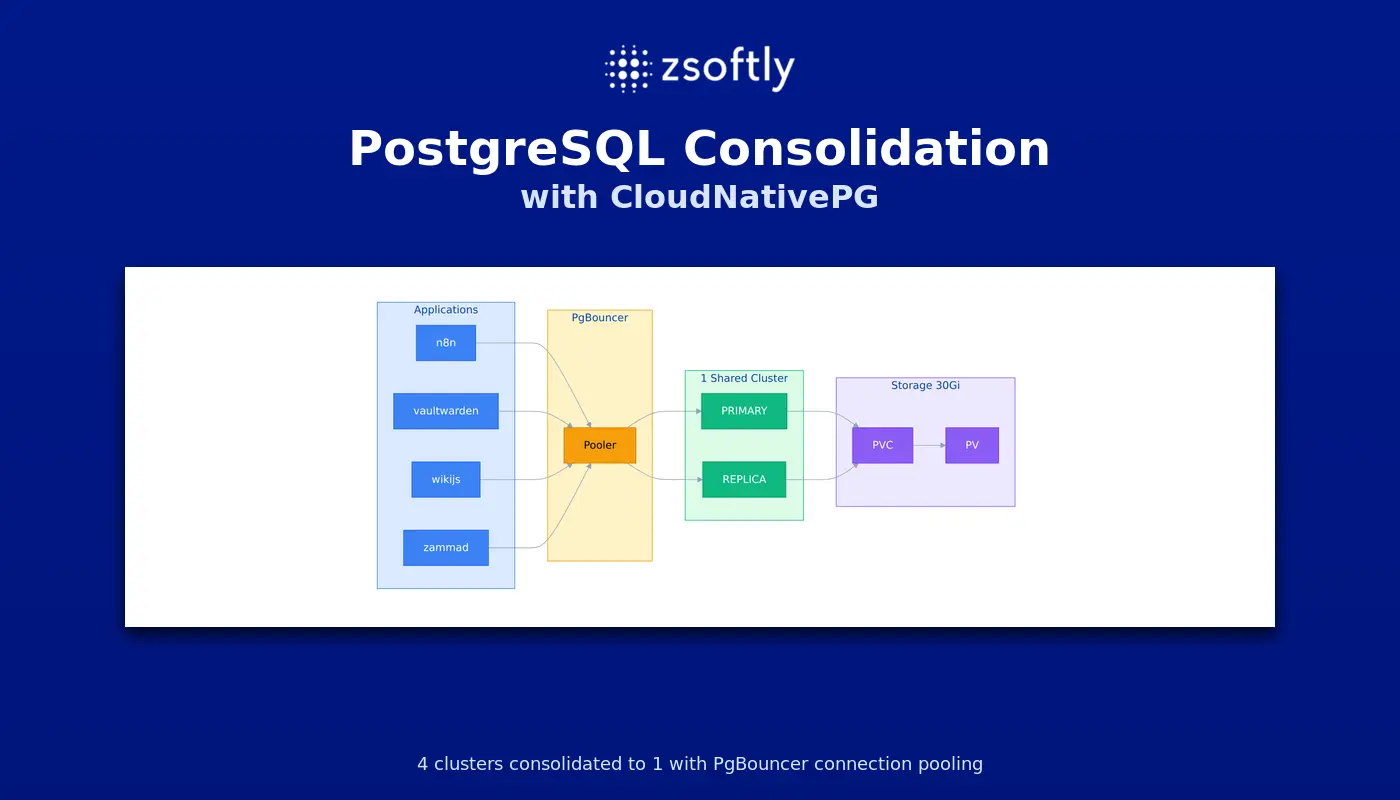
Applications connect to platform-db-pooler.platform-db.svc on port 5432. PgBouncer handles connection pooling in transaction mode. The CNPG cluster manages replication and failover automatically.
The Gotcha: Sync Waves Required
Our first deployment failed. The init job could not authenticate to the database.
FATAL: password authentication failed for user "postgres"
Root cause: ArgoCD synced all resources in parallel. The CNPG Cluster bootstrapped before ExternalSecret finished syncing the superuser password from AWS Secrets Manager. CNPG generated its own random password. The init job read the (now-synced) secret with a different password.
The fix: ArgoCD sync waves.
# ExternalSecrets must sync FIRST (wave -1)
apiVersion: external-secrets.io/v1
kind: ExternalSecret
metadata:
  name: platform-db-superuser
  annotations:
    argocd.argoproj.io/sync-wave: '-1'
# CNPG Cluster syncs AFTER secrets exist (wave 0)
apiVersion: postgresql.cnpg.io/v1
kind: Cluster
metadata:
  name: platform-db
  annotations:
    argocd.argoproj.io/sync-wave: '0'
Sync order:
- Wave -1: ExternalSecrets create Kubernetes secrets from AWS Secrets Manager
- Wave 0: CNPG Cluster reads superuserSecret (now exists with correct password)
- PostSync: Init job creates database users
This is not documented anywhere. If you use CNPG with ExternalSecrets and ArgoCD, you need sync waves.
The Migration
We migrated apps in order of risk. Lowest risk first.
Migration Steps (per app)
- Scale down the application
- Dump from old cluster using postgres superuser
- Restore to shared cluster
- Grant permissions to app user
- Update Helm values to point to new host
- Push changes via GitOps
- Scale up and verify
Example: Wikijs Migration
# 1. Scale down
kubectl scale deployment p11-wikijs -n wikijs --replicas=0

# 2. Dump from old cluster
kubectl exec wikijs-db-1 -n wikijs -c postgres -- \
  pg_dump -U postgres -d wikijs --no-owner --no-acl > wikijs.sql

# 3. Restore to shared cluster
cat wikijs.sql | kubectl exec -i platform-db-1 -n platform-db -c postgres -- \
  psql -U postgres -d wikijs

# 4. Grant permissions
kubectl exec platform-db-1 -n platform-db -c postgres -- \
  psql -U postgres -d wikijs -c "GRANT ALL ON ALL TABLES IN SCHEMA public TO wikijs"
Then update the Helm values:
# Before
cloudnativepg:
  enabled: true
wiki:
  postgresql:
    postgresqlHost: wikijs-db-rw

# After
cloudnativepg:
  enabled: false
wiki:
  postgresql:
    postgresqlHost: platform-db-pooler.platform-db.svc
Commit, push, wait for ArgoCD sync, scale up, verify.
Migration Summary
| App | Tables Migrated | Result |
|---|---|---|
| wikijs | 34 | 1/1 Running |
| n8n | 56 | 1/1 Running |
| vaultwarden | 30 | 1/1 Running |
| zammad | 120 | All Running |
| Total | 240 | All successful |
Important Notes
Use postgres superuser for dump/restore
Peer authentication fails for app users when using kubectl exec. Always use the postgres superuser:
# This fails
kubectl exec db-1 -c postgres -- pg_dump -U appuser -d appdb

# This works
kubectl exec db-1 -c postgres -- pg_dump -U postgres -d appdb --no-owner --no-acl
Grant permissions after restore
After restoring as postgres, grant ownership to the app user:
GRANT ALL PRIVILEGES ON ALL TABLES IN SCHEMA public TO appuser;
GRANT ALL PRIVILEGES ON ALL SEQUENCES IN SCHEMA public TO appuser;
Wait for ArgoCD sync before deleting resources
If you manually delete Kubernetes resources that ArgoCD manages, ArgoCD recreates them on the next reconciliation. Wait for ArgoCD to sync the new values first. Then it prunes the old resources automatically.
EKS Auto Mode ArgoCD
If you run ArgoCD as an EKS Auto Mode capability, the CLI requires token-based authentication. Standard argocd login does not work. See ArgoCD CLI Login on EKS Auto Mode for the correct setup.
Results
| Metric | Before | After | Change |
|---|---|---|---|
| CNPG Clusters | 4 | 1 | -75% |
| Total Pods | 4 | 4 | Same |
| Storage | 50Gi | 30Gi | -40% |
| CPU Requests | 550m | ~250m | -300m |
| Memory | 1.3Gi | ~500Mi | -800Mi |
| PDBs | 4 | 1 | -75% |
| HA Replicas | 0 | 1 | Added |
| Backup Jobs | 4 | 1 | -75% |
| Conn Pooling | No | Yes | Added |
The consolidation reduced operational overhead without sacrificing reliability. Node drains work smoothly with a single PDB. Backups are simpler with one schedule. Connection pooling reduces database load.
We saved approximately 300m CPU and 800Mi memory. More importantly, we eliminated 3 PodDisruptionBudgets that were blocking node consolidation.
Lessons Learned
-
Analyze access patterns first. Not all databases should be consolidated. We chose these four because they have low write frequency, independent schemas, and similar SLAs. Critical production databases stay isolated.
-
Consolidation can add HA, not just reduce costs. Our single-instance clusters had no replicas. The shared cluster runs PRIMARY + REPLICA with automatic failover. We improved reliability while reducing overhead.
-
Sync waves are mandatory for CNPG + ExternalSecrets. The superuser secret must exist before the Cluster resource. Use wave -1 for ExternalSecrets, wave 0 for Cluster.
-
Reuse existing secrets. We already had per-app database credentials in AWS Secrets Manager. No need to create new ones.
-
Migrate in order of risk. Start with the least critical app. Build confidence before touching production data.
-
Do not manually delete ArgoCD-managed resources. Wait for the sync. Let ArgoCD prune automatically.
-
PgBouncer transaction mode works for most apps. All four applications worked without changes to connection handling.
Running multiple PostgreSQL clusters on Kubernetes? As an AWS Partner, ZSoftly provides Kubernetes consulting and database optimization for Canadian companies. Talk to us
Sources
- CloudNativePG Documentation - CloudNativePG
- CloudNativePG Pooler - PgBouncer integration
- ArgoCD Sync Waves - ArgoCD Documentation
- External Secrets Operator - ESO Documentation